Ping monitor for macOS
The latency monster in your menu bar
PingZilla pings your connection and shows the result next to your clock, all day. When the network slows down or your VPN drops, you know before it costs you a call, a match, or a deploy.
$0.99 to support development · Open source · macOS 13+

your menu bar, from now on
A monster with moods
The menu bar icon is the dashboard. PingZilla's face follows your connection quality, so a glance tells you whether trouble is on the way or already here.




Everything it watches for
VPN drop alerts
PingZilla notices the moment your IP changes and tells you straight away. Your traffic stays where you meant it to go.
Any host you care about
Point it at your API, a client's server, or your game server. Each target gets its own live readout and its own alerts.
History and stats
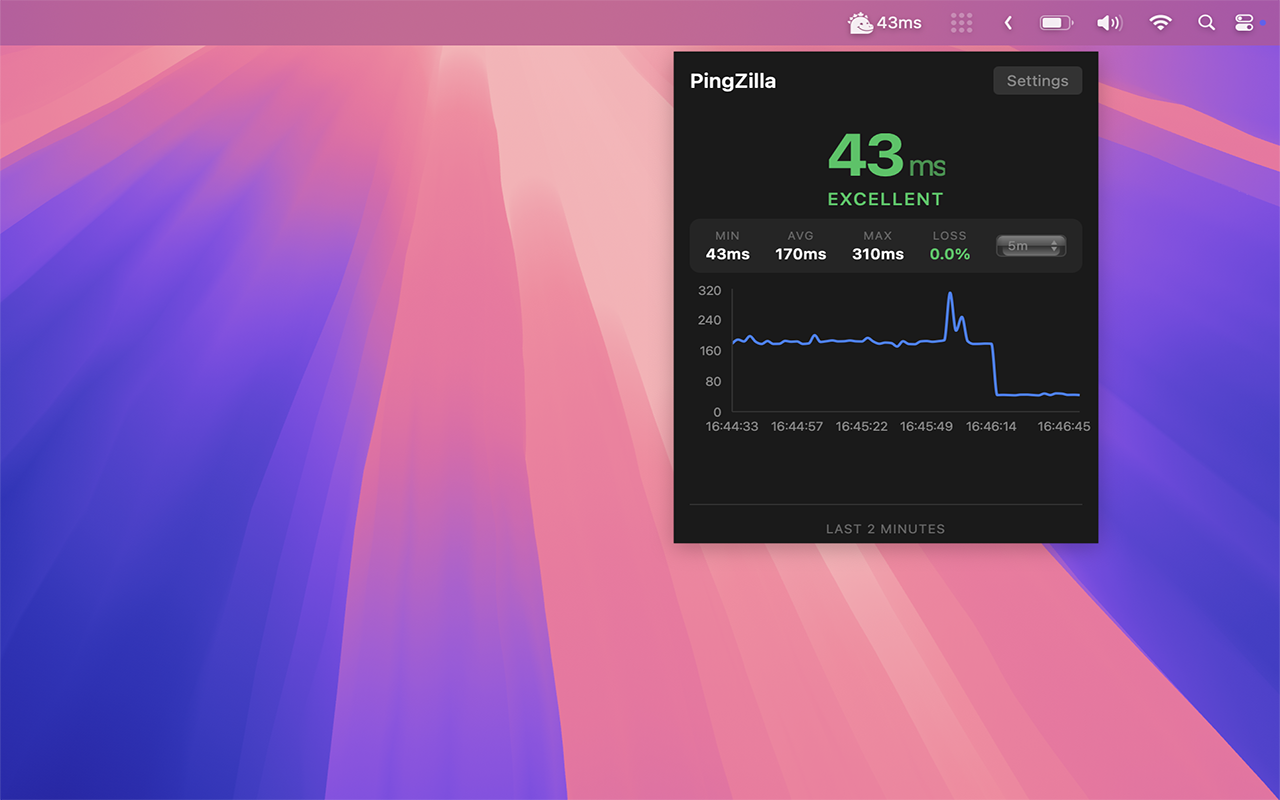
Min, max and average latency, with a live graph one click away. Spikes and patterns show up while there's still time to do something about them.
Quiet until it matters
One notification when the connection drops, one when it comes back. The rest of the time it stays out of your way.
At home in the menu bar
Starts at login, sits next to your clock, and runs on a sliver of memory. Built native for macOS with Tauri and Rust.
Built for people who feel lag
Remote workers
Working over a VPN from a cafe or a co-working space? PingZilla tells you the second the tunnel drops, before anything sensitive travels in the open.
Gamers and streamers
Your ping is on screen without alt-tabbing. Lag spikes show up in the menu bar before they show up in the killfeed.
Developers
Keep an eye on staging while you work, watch a deploy settle, and know whether it's your wifi or the server acting up.
Next to your clock, all day
PingZilla sits in the macOS menu bar and shows your live ping with its mood face. Always visible, out of the way, and one click from the full picture.

One click for the whole picture
The panel shows your current ping, min, max, average and packet loss, with a live graph of the last few minutes. Enough to tell right away whether the problem is your network or somebody else's.
How PingZilla stacks up
VPN detection, mood icons and an open codebase, together in one menu bar app.
| Feature | PingZilla | iStat Menus | Ping Menu Bar | Network Radar |
|---|---|---|---|---|
| VPN Detection | Yes | No | No | No |
| Mood Icons | Yes | No | No | No |
| Site Monitoring | Yes | No | Yes | Yes |
| Native App | Yes | Yes | Yes | Yes |
| Open Source | Yes | No | No | No |
PingZilla ★ That's us
iStat Menus
Ping Menu Bar
Network Radar
Ready to stomp latency?
PingZilla is on the Mac App Store for $0.99, with the whole codebase on GitHub. Install it once and your connection is watched from then on.
Open source · macOS 13+ · $0.99 to support development